FAQs
Symptoms
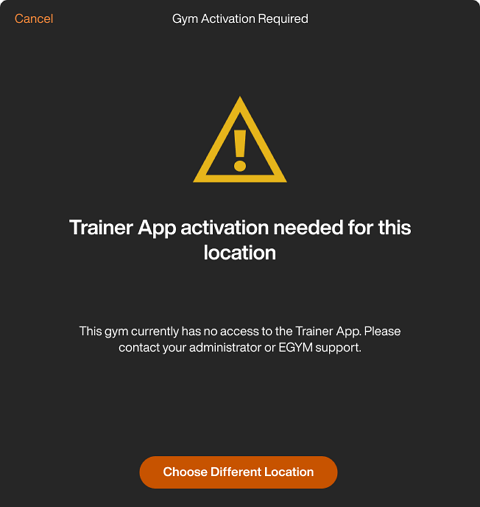
When you log in to the EGYM Trainer App or switch between gym locations, you encounter a screen that says "Trainer App activation needed for this location."
Cause
For data security reasons, the EGYM Trainer App must be enabled for each individual gym location.
If you work at one location: You will see this message immediately after login if the gym location is not yet activated.
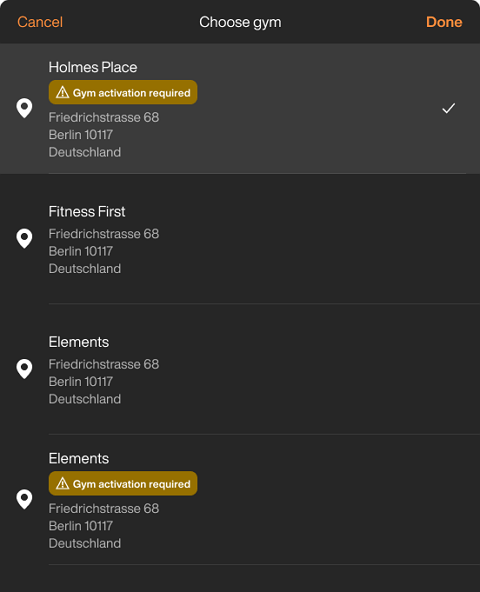
If you work at multiple locations: You will see a status label next to specific gyms in the menu. Locations that are not activated are marked with a Gym activation required message. Activated gym locations won't show this message.
Troubleshoot
If you don't have access to a specific gym location but should, follow these steps:
If you have access to multiple gyms, tap . Make sure to select the correct gym location.
Otherwise, proceed to step 2.
Contact your gym’s administrator or manager. They can verify if the Trainer App is included in the gym's current EGYM configuration.
If your gym administrator confirms that the service should be active, reach out to EGYM support or your designated support channel to request a configuration check.
Uwaga
For administrators: Activation is managed at the gym-level. If you recently added new EGYM products to your gym, there may be a short processing period before the Trainer App becomes active.