Smart Strength Open Mode Onboarding Guide
Introduction
About this Guide
This guide covers Open Mode on EGYM Smart Strength Machines. Smart Strength machines have two operating modes:
Circuit Mode – Guided workout flow, structured by the gym
Open Mode – Flexible training experience where you can choose between Auto and Individual modes.
Smart Strength Overview
EGYM Smart Strength is a fully connected strength training solution designed to meet the needs of every member while streamlining operations for gym owners. The combination of smart equipment and real-time personalization delivers safe, effective, and measurable workouts that adapt to each member's needs.
Open Mode Overview
Open mode offers two different training modes (Auto, Individual) that adapt to the user's needs and experience level.
To change modes, tap on the current training mode in the menu icon (top left). On the mode selection screen, select Auto or Individual.

Auto Mode
EGYM recommends Auto Mode for members who want structured guidance.
Use of training programs (Basic or EGYM+).
Training settings are automatically defined by the training program.
Strength test scheduled after six days of training.
Live feedback always uses the EGYM curve.
Individual Mode
EGYM recommends Individual Mode for members who want full autonomy.
Configure your own training: method, repetitions, weight.
Settings are saved separately for each method and machine.
You can switch between live feedback options: curve (guided) and bar (free, non-guided) views.
Training Settings
Métodos de treino
Os diferentes métodos de treino disponíveis permitem um treino mais eficaz e individualizado, específico para os diferentes grupos-alvo.
| Regular Com o método de treino Regular, a resistência mantém-se sempre constante, à semelhança do treino de força clássico. Benefits:
| |
| Negativo Maior resistência na fase excêntrica do que na fase concêntrica. Benefits:
| |
| Adaptativo A resistência é reduzida durante o exercício adaptativo, dependendo do potencial de ação muscular remanescente. Benefícios: estimula o crescimento muscular através do aumento da fadiga muscular.
| |
| Isocinético (não disponível em todos os mercados) Com o método de treino isocinético, a energia gasta pelo utilizador cria uma resistência igual no equipamento. Benefícios: treinar no limite da força natural em cada movimento angular
| |
| Explosivo Peso constante com aceleração máxima. Benefícios: aumenta a potência e o desempenho físico no desporto, bem como a força para as atividades diárias.
| |
| Max Out The Max Out training method starts at a low resistance (35% of the strength test result). After every successful repetition, the machine increases the load by 5%. The set concludes when a repetition cannot be completed with proper form. Benefits:
|
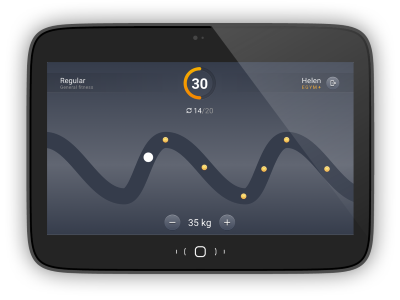
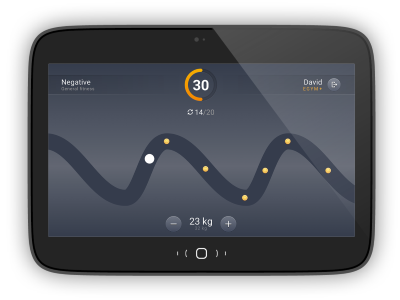
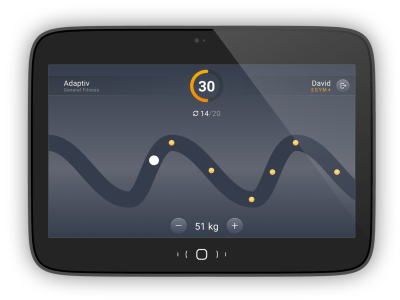
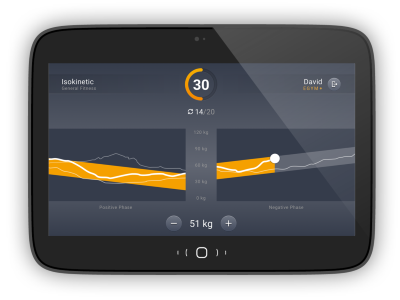
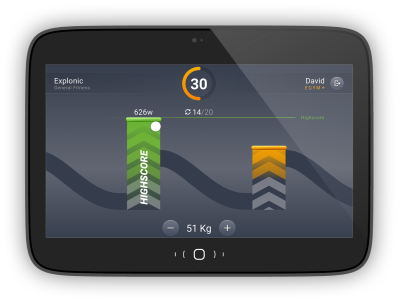
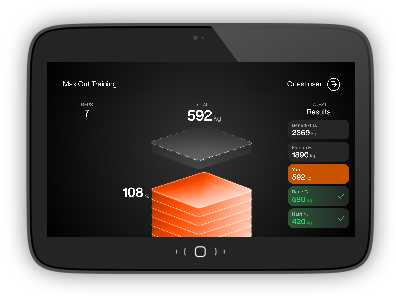
Change Training Settings
Select Adjust Training. Then select the training method you want.

Select the Training Method (Regular. Negative, Adaptive, Isokinetic, Explonic) to change.

Tap + or - to change the Repetitions or Training weight. In Individual mode, you can also switch the visualization between Guided and Free.
Select Confirm to save your changes or Strength Test to conduct a new test.
Optimized Onboarding
EGYM has optimized Smart Strength Open Mode Onboarding and improved it visually. You can see a new welcome screen and can now skip intro or test training.
Login to a EGYM Smart Strength machine,
Select Start to learn how to use the machine.

Nota
Select Skip to go directly to the test training (Step 4).
Follow the on-screen guidance and tap Next until you reach the test training screen.
Select Next to conduct test training.

Follow the on-screen guidance and tap Ok.
Nota
You must complete at least 3 reps in order to proceed to the next step.
Select I am fine. Then you will proceed to the strength test.

Nota
If you select I need help, you will be prompted to contact a trainer.
Max Out Training
Max Out Training is a new progressive strength training feature that helps members push themselves incrementally with clear guidance and lightweight gamification. Max Out is available for both logged in users and in guest mode.
Nota
You need to complete a strength test in order to use Max Out Training.
Select the Max Out Training >.
Tap Start.

Tap Continue.

View your results and tap Logout.

Recovery Timer
After you complete a set, you can see a real-time countdown timer on the pre-training screen. The timer shows elapsed rest time and suggests when to start the next set. The screens vary for Auto and Individual Mode:
Auto Mode:


Individual Mode:


The rest period varies based on the exercise type (isolated or compound) and the number of reps in the set.
Reps in Set | Isolated Exercise Rest Period | Compound Exercise Rest Period |
|---|---|---|
1–6 reps | 150 | 180 |
7–12 reps | 90 | 120 |
13–17 reps | 60 | 90 |
18+ reps | 30 | 45 |
Isolated Exercises:
M1 Extensão de pernas
M2 Abdominais
M3 Extensão lombar
M4 Flexão de perna
M8 Glutes
M10 Abdutor
M11 Adutor
M12 Rotação do torso
M13 Borboleta
M14 Borboleta invertida
M15 Flexão de bíceps
M16 Calf Press
M18 Tríceps
Compound Exercises:
M5 Prensa de peito
M6 Remo
M7 Lat Pulldown
M9 Prensa de pernas
M17 Prensa de ombros
M19 Elevação pélvica
M20 Agachamento
Additional Improvements
EGYM has made the following updates to improve the user experience:
Guest Mode
You can instantly configure machine and training settings without login. This includes access to Max Out training and the Strength Test.

Auto Logout Timer
You can see a countdown timer on the result screen after a finished set or session. This clearly communicates when logout will occur.
