Staff Performance
Measure how your trainers are supporting members.
Use this data to:
track the number of created or updated training plans.
review how many assessments and tasks were completed.
recognize strong staff performance or offer extra support.
This metric shows how many training plans were created or updated using the Trainer App.
Select the boxes next to each option to filter the data:
Use it to: Track how actively trainers are tailoring and maintaining personalized training plans for members.

This metric shows how many health information entries were created or updated by trainers each month in the EGYM Trainer App.
Huomaa
To enter health information in the EGYM Trainer App, go to , select a member, then tap and the + icon.
Use it to: Understand how often trainers are documenting important member health data, which supports personalized training and care.

This metric tracks the number of tasks created and completed by trainers in the EGYM Trainer App each month.
Use it to: Monitor trainer activity and ensure key follow-ups and workflows are being completed efficiently.

This metric shows the number of tasks in the EGYM Trainer App that are still open at the end of each month and the average across the selected time frame.
Use it to: Track how effectively trainers are keeping up with follow-ups and member interactions and identify when staff may need additional support. Fewer open tasks can indicate that trainers are keeping up with responsibilities and maintaining consistent engagement with members.

This metric shows how many tasks were created manually by trainers compared to tasks created from automated task chains (found under Templates) in the EGYM Trainer App.
Use it to: Understand how trainers are managing their daily responsibilities and when to introduce task chains to reduce workload and improve consistency. Frequent manual task creation may indicate a need to optimize processes or set up task chains. Task chains standardize workflows, minimize missed follow-ups, and free up trainer time for higher-value interactions with members.

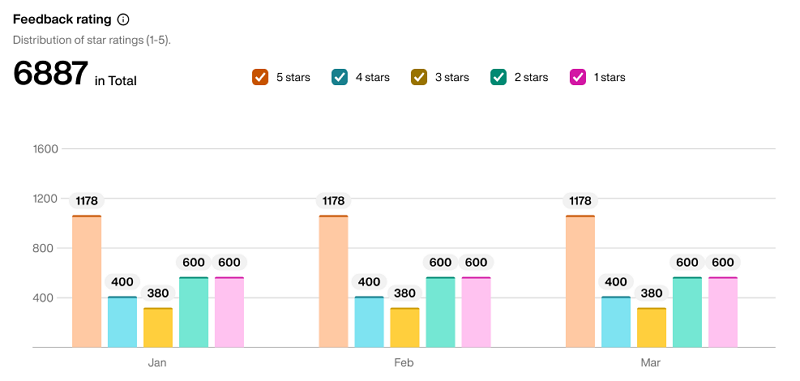
This metric shows how member feedback ratings are distributed during the selected time period. Ratings range from one to five.
Use it to: Understand the full picture of member satisfaction beyond the average and identify whether lower ratings are isolated or part of a recurring trend.
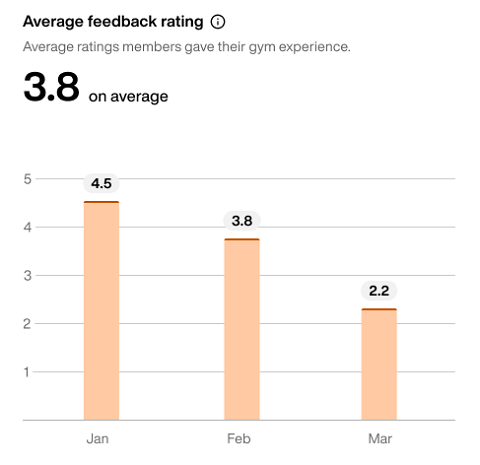
This metric shows the average rating members have given your gym through the Member App during the selected time period. Ratings range from one to five.
Use it to: Track overall member satisfaction over time and identify trends or periods where satisfaction may be declining.
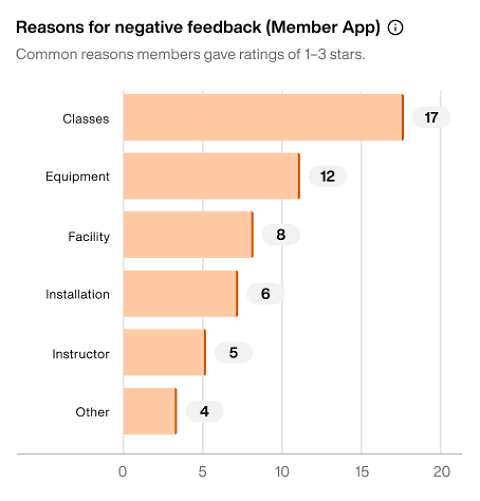
This metric shows the most common reasons for negative feedback (three stars or fewer) submitted in the Member App during the selected time period.
Use it to: Identify recurring issues affecting member satisfaction and take targeted actions to improve the overall member experience.
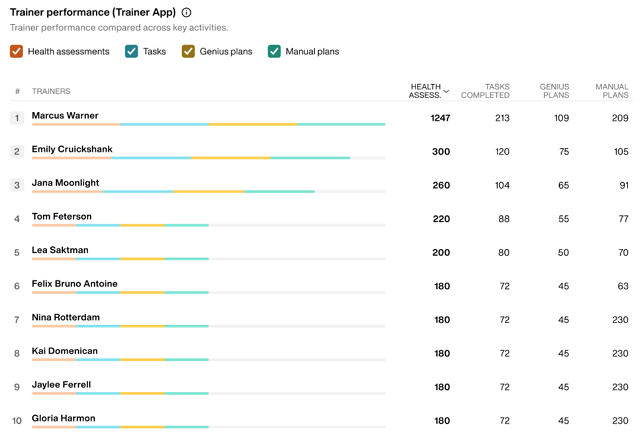
This metric shows how trainers' performance compares across key activities, allowing you to identify top performers and track engagement across different training delivery methods. The table displays each trainer ranked by their total activity level.
Use it to: Track individual trainer productivity and effectiveness across health assessments, task completion, training plan creation (both through Genius AI and manual creation), and identify which trainers are most active in different areas.
Select the boxes to filter the data:
HEALTH ASSESSMENTS: Number of health assessments conducted by the trainer
TASKS COMPLETED: Number of tasks the trainer has completed
GENIUS PLANS: Number of training plans created using the EGYM Genius AI
MANUAL PLANS: Number of training plans manually created by the trainer
Huomaa
You can select or deselect the filters to customize which data is displayed. For example, select only Genius plans and Manual plans to view the total training plans created by each trainer.
The horizontal stacked bar chart next to each trainer's name provides a visual breakdown of their activity distribution across these four categories, making it easy to see at a glance which trainers focus more on certain activities.