Take xCapture
This feature automatically captures and logs cardio workout data by photographing non-connected cardio machine consoles. xCapture collects time, distance & calorie information from a photo of any cardio screen such as treadmills, ellipticals, steppers, and more.
This is useful for tracking workouts on cardio equipment that is not networked with EGYM. Take a photo of the machine's full control panel after a workout, and the system automatically extracts and records your workout information.
What xCapture records
Duration: Total workout time.
Distance: Distance traveled during the workout.
Calories: Calories burned.
Equipment type: Identifies the machine used (treadmill, bike, elliptical, etc.).
Requirements for xCapture to work
You must grant the Member App camera access in your phone's settings.
xCapture works with cardio machines that have readable digital displays showing time, distance, and calories (treadmills, bikes, ellipticals, steppers, etc.).
How to use xCapture
Complete your cardio workout on a non-EGYM connected machine.
Open the menu by tapping the button at the top of the home screen.
Select .
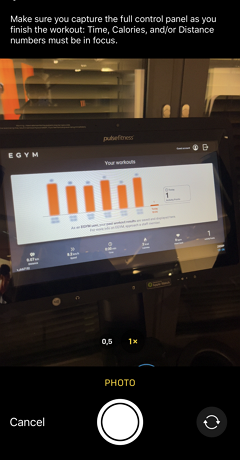
Point your phone's camera at the full control panel of the cardio machine's display screen.
Take a clear photo showing all the workout data.
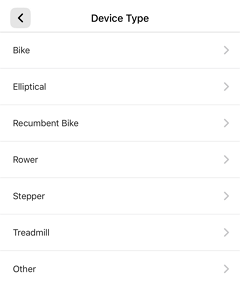
Select the cardio device type. This submits your xCapture for processing.
Nota
Processing of xCapture data can take up to 24 hours.
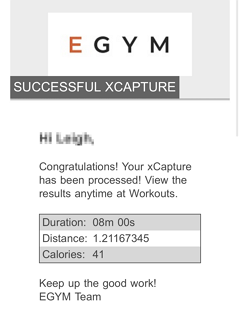
You'll be notified via your EGYM ID email if your xCapture was successful. View the workout in the Member App under Workout History for the relevant date.
Suggerimento
Make sure the machine display is clearly visible and well-lit for accurate photo capture.
Take the photo straight-on at the full control panel for best results.
xCapture works with cardio machines that have readable displays (treadmills, bikes, ellipticals, steppers, etc.).
You must take a live photo through the xCapture feature—you cannot upload pre-taken photos from your camera library. Be prepared to take the photo quickly, as the machine's display screen typically returns to the home screen after approximately one minute.
Nota
Your app may appear differently depending on your gym's Member App customization. If you have any questions, reach out to a trainer or gym manager.