Genius Chat Beta
About Genius Chat Beta
EGYM Genius AI now lets you describe your real-life situation in your own words, so your training plan can adapt to your needs. Whether you're feeling fatigued, managing physical limitations, traveling, or working out with limited equipment, you can type a short message and Genius will adjust your training plan accordingly.
Notera
Genius Chat is a Beta release. This means:
The feature is live and available for you to use.
The feature is experimental. Genius AI is learning how members use prompts to improve accuracy over time.
Genius may occasionally interpret your input differently than expected.
Before you start
Make sure your gym app is updated to the latest version.
You must have an active Genius AI training plan in your gym app.
How to use Genius Chat Beta
Depending on whether you want to edit your Genius training plan or just today's workout session, do one of the following:
Genius Chat Beta for training plans:
In the Genius widget (), tap .
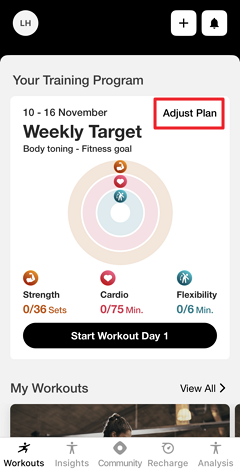
Genius Chat Beta for workout sessions:
Under , tap (1, 2, 3).
Or, navigate to , tap , and select (1, 2, 3, etc.).
Tap the settings icon at the top of the screen.
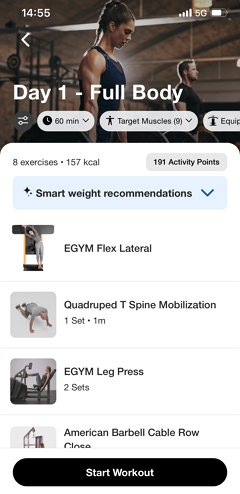
Open .
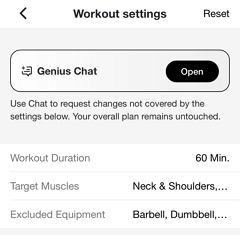
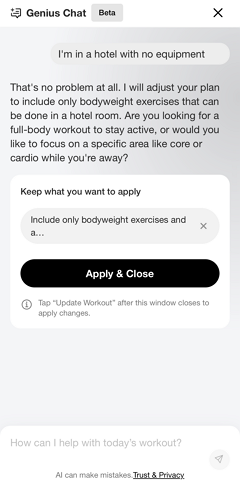
Type a short description of your current situation. Refer to What to tell Genius Chat Beta for more information. You can continue the conversation to refine the changes.
Notera
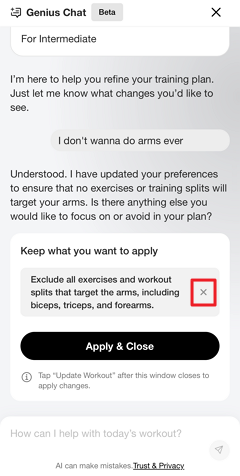
Tap the x icon to remove suggested changes as needed.
You can also come back later to remove applied changes.
Notera
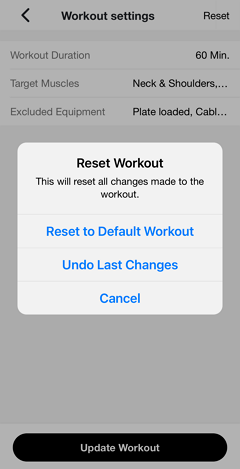
If needed, you can always go back to the workout settings and tap > to revert to the original version.
Once done, tap .
Review the settings summary. Tap on the field to make further adjustments. Adjust the other settings as needed.
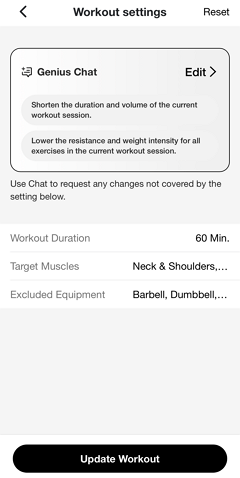
Tap .
Genius will review your input and adjust your training plan or workout session based on what you've described.
Refer to How Genius interprets your input for more information.
What to tell Genius Chat Beta
You don't need to use specific commands or technical language. Just describe your situation naturally. Here are some examples:
Fatigue: "I've been feeling really tired this week and need a lighter session."
Injury: "My right shoulder is sore."
Travel: "I'm in a hotel with no equipment."
Limited equipment: "I only have access to dumbbells and a resistance band today."
General preference: "I want shorter workouts — about 30 minutes."
Genius will interpret your message and update your training plan to match your needs as closely as possible. For example, for “I’m in a hotel with no equipment,” Genius may suggest only bodyweight exercises.
How Genius interprets your input
Genius reads your message and determines the best way to adjust your training plan. There are three possible outcomes:
Valid input: Genius understands your situation and updates your training plan right away.
Ambiguous input: Your message is unclear. Genius may ask for clarification or make its best interpretation.
Unsupported input: Some requests are not adjustable by Genius. In these cases, your training plan will remain unchanged. Try rephrasing your message or being more specific.
Notera
Always review your updated training plan before starting.
Adjustments are based on your input and existing training data. Results may vary.
Frequently asked questions
Q: Will my training plan or workout session change immediately after I save it?
A: Yes. Genius processes your input right away and updates your training plan or workout session. Review the updated plan before your workout to make sure it reflects your situation.
Notera
Genius Chat Beta will update either your training plan for that week or that day's workout session, depending on where you open it. For example, if you use Genius Chat Beta at the workout session level, it will only update that day's workout and will not affect your training plan.
Q: Will Genius Chat Beta apply these changes to future plans?
A: Genius Chat Beta applies training plan-level changes for each new week unless you remove them (open Genius Chat Beta and tap the x icon on an applied change).
However, changes made at the workout session level will only be applied to that individual session.
Q: Genius doesn't understand what I wrote. What should I do?
A: If your input is ambiguous or unsupported, Genius may not adjust your training plan as expected. Try rephrasing with more specific details. For example, instead of "take it easy," try "I want a low-intensity session today with no jumping exercises."
Q: Is my input stored or used to improve the AI?
A: Yes. Genius Chat Beta stores your input and your chat history for learning purposes to create even more personalized training experiences in the future. However, this information is not accessible or viewable by anyone at EGYM.