Smart Machines & EGYM eco Installation Requirements
Introduction
Welcome to EGYM!
Please note the following technical requirements for the installation of your EGYM equipment and provide the corresponding information to your electrician and IT technician. To ensure smooth delivery, all technical requirements must be met.
Further information on the topics in this document is available in the corresponding Owner's Manual(s). Read these manuals thoroughly to ensure that you are familiar with the requirements.
We will assist you, your electrician, or your IT technician with the necessary preparations and clarify any questions.
If delivery and/or installation is not possible due to insufficient site preparation, we will be forced to set a new delivery date and invoice the additional costs incurred.
If you have any questions, please contact EGYM Support (see Contact details) or your distributor.
Before delivery
General preparation
When planning your infrastructure, consider all EGYM machines, as well as your additional equipment and office spaces
Make an appointment with an IT technician or call on a trained IT technician from within your organization who has experience in the administration of network infrastructure.
Ideally, apply for a broadband connection with a reliable Internet provider 3 months before delivery of your EGYM equipment.
A bandwidth of at least 5 Mbit/s (download) per EGYM machine is required.
For example, a circuit of 8 EGYM machines with a Fitness Hub, requires a bandwidth of at least 45 Mbit/s. This ensures sufficient coverage for regular training on the machines, and any machine updates.
To additionally provide members with movie or music streaming services, a bandwidth of 1-2 Mbit/s (download) per user / connected device is sufficient.
For a Wi-Fi connection, note the router requirements described in this document (see Wi-Fi requirements. Router equipment provided by EGYM is recommended.
A power outlet should be located as close as possible to the machines in a floor box. This prevents the need for cable trunking to be installed in your facility. If the machines are installed against walls, the cables can also be routed in cable trunking. For further power requirements, see Electrics and cabling. Please note the electrical requirements you received from EGYM and talk to your electrician or, alternatively, contact EGYM support (Contact details).
Note
If electrical work must be done to provide power to the machines, we recommend installing LAN cables / LAN ports at the same time.
If you would like to use RFID tags not provided by EGYM, these should be checked in advance for compatibility with EGYM machines. For further information, contact your EGYM Implementation Manager.
Site preparation checklist
Before delivery of your EGYM equipment you will receive an email explaining the next steps. Make sure that the items in the checklist below are taken care of no later than 6 weeks before delivery of your equipment:
Floor area / platform has been prepared.
Room plan has been created.
Sockets have been prepared.
RCCB (residual current circuit breaker) configuration: a maximum of 4 machines per RCCB have been prepared. See Electrics and cabling for the recommended installation requirements of circuit breakers (OCPD / overcurrent protection devices).
Required Internet bandwidth is available.
Firewall has been disabled or set accordingly (see Firewall exceptions: IP addresses).
LAN option: one LAN cable with connector is available per machine.
Wi-Fi option: one LAN cable with connector is available for the EGYM router.
Machine startup and shutdown
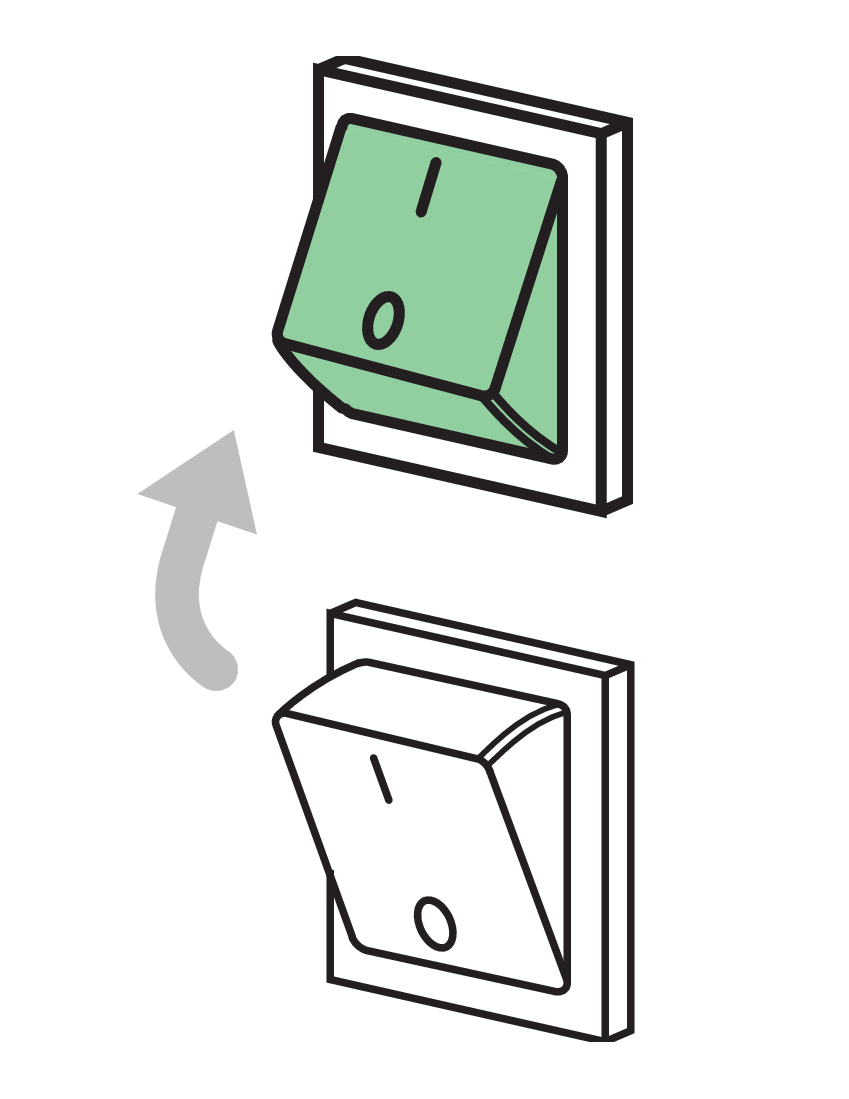
EGYM equipment should always be started and shut down using the power switch provided.
Caution
Do not use residual current circuit breakers (RCCB) or overcurrent protection devices (OCPD) to switch off the machines! Doing so could cause the RCCB switch to develop a fault, which in turn could cause surge voltage in the electronic circuit and irreparably damage your EGYM hardware.
If you would like to switch all your EGYM equipment on and off at once in order to save time, a panel switch must be installed specifically for this purpose by a qualified electrician, in addition to any residual current circuit breakers (RCCB) / ground fault circuit interrupters (GFCI).
Electrics and cabling
Power requirements
Caution
The power cord must always be easily accessible. Ensure that the power cord is not knotted or twisted, cannot be stood on or tripped over, and is not trapped under any equipment or objects.
Caution
Each EGYM machine must be connected directly to a separate power outlet. The use of extension cables or multi-distribution sockets is not permitted.
Note
The leakage current of EGYM machines is < 3.5 mA (all regions).
Caution
* The M20 Squat can operate with different voltage configurations. The higher voltage configuration allows higher training weights. Before installing the machine with a high voltage outlet, check your machine’s configuration. The M20 voltage configuration may only be changed by an EGYM service technician.
Installation recommendations
Caution
Only use cables and sockets with a grounding/earth connection.
OCPD type / rating | RCCB type / rating | Machines per leakage current detector (RCCB / GFCI) | |
|---|---|---|---|
Central Europe | Type B16 circuit breaker | Type A (AC and pulsing current- sensitive) RCCB (I∆N = 30mA) | Max. 4 Smart Strength machines (incl. M9) per RCCB (I∆n = 30mA) |
Denmark | Type B16 circuit breaker | Type A (AC and pulsing current- sensitive) RCCB (I∆N = 30mA) | Max. 4 Smart Strength machines (incl. M9) per RCCB (I∆n = 30mA) |
United Kingdom | 13 A circuit breaker | Type A (AC and pulsing current- sensitive) RCCB (I∆N = 30mA) | Max. 4 Smart Strength machines (incl. M9) per RCCB (I∆n = 30mA) |
Australia | Type C10 circuit breaker | Type A (AC and pulsing current- sensitive) RCCB (I∆N = 30mA) | Max. 4 Smart Strength machines (incl. M9) per RCCB (I∆n = 30mA) |
North America (USA, Canada) | Circuit breaker with a short-time delay (magnetic trip threshold at least 5x rated current) | Type A (AC and pulsing current- sensitive) RCCB (I∆N = 30mA) | Each machine requires a separate Class A GFCI (ground fault circuit interrupter) outlet or circuit breaker. |
Caution
Machines per OCPD: the sum of rated currents must not exceed the nominal rating of your OCPD (overcurrent protection device).
Note
A Type B+ RCCB is not recommended; the high frequency sensitivity can trip the circuit breaker unnecessarily.
Power requirements
Caution
The power cord must always be easily accessible. Ensure that the power cord is not knotted or twisted, cannot be stood on or tripped over, and is not trapped under any equipment or objects.
Caution
Each EGYM machine must be connected directly to a separate power outlet. The use of extension cables or multi-distribution sockets is not permitted.
Note
The leakage current of EGYM machines is < 3.5 mA (all regions).
Power connection outlet | Supply voltage | Rated current | |
|---|---|---|---|
Central Europe | CEE 7/3 or CEE 7/5 | 230V, 50Hz | M9: 16A Others: 8A |
Denmark | Type K or CEE 7/5 | 230V, 50Hz | |
United Kingdom | BS 1363 | 230V, 50Hz | M9: 13A Others: 8A |
North America | M9: NEMA 5-20 Others: NEMA 5-15 | 110V - 120V, 60Hz | M9: 20A Others: 15A |
Installation recommendations
Caution
Only use cables and sockets with a grounding/earth connection.
OCPD type / rating | RCCB type / rating | Machines per leakage current detector (RCCB / GFCI) | |
|---|---|---|---|
Central Europe | Type B16 circuit breaker | Type B (DC-sensitive) RCCB (I∆N = 30mA) | Max. 4 machines (incl. M9) per RCCB (I∆n = 30mA) |
Denmark | Type B16 circuit breaker | Type B (DC-sensitive) RCCB (I∆N = 30mA) | Max. 4 machines (incl. M9) per RCCB (I∆n = 30mA) |
United Kingdom | 13 A circuit breaker | Type B (DC-sensitive) RCCB (I∆N = 30mA) | Max. 4 machines (incl. M9) per RCCB (I∆n = 30mA) |
Caution
Machines per OCPD: the sum of rated currents must not exceed the nominal rating of your OCPD (overcurrent protection device).
Caution
Tested RCCBs: DFS 4 040-2/0,03 B SK or DFS 4 040-4/0,03 B SK from Doepke
Using unauthorized or incompatible RCCBs can compromise safety and increase the risk of electrical hazards.
Note
A Type B+ RCCB is not recommended; the high frequency sensitivity can trip the circuit breaker unnecessarily.
Power requirements
Power connection outlet | Rated power | Supply voltage | Rated current | Leakage current | |
|---|---|---|---|---|---|
Central Europe | CEE 7/3 or CEE 7/5 | 120W | 85 - 264V, 50Hz/60Hz | 1.4A (115VAC) 0.7A (230VAC) | 0.75mA (240VAC) |
Denmark | Type K or CEE 7/5 | 120W | 85 - 264V, 50Hz/60Hz | 1.4A (115VAC) 0.7A (230VAC) | 0.75mA (240VAC) |
United Kingdom | BS 1363 | 120W | 85 - 264V, 50Hz/60Hz | 1.4A (115VAC) 0.7A (230VAC) | 0.75mA (240VAC) |
North America | NEMA 5-15 | 120W | 85 - 264V, 50Hz/60Hz | 1.4A (115VAC) 0.7A (230VAC) | 0.75mA (240VAC) |
Installation recommendations
Caution
Only use cables and sockets with a grounding/earth connection.
OCPD type / rating | RCCB type / rating | Machines per leakage current detector (RCCB / GFCI) | |
|---|---|---|---|
Central Europe | Type B16 circuit breaker | Type A (AC and pulsing current-sensitive) RCCB (I∆N = 30mA) | Max. 8 Flex machines per RCCB (I∆n = 30mA) |
Denmark | Type B16 circuit breaker | Type A (AC and pulsing current-sensitive) RCCB (I∆N = 30mA) | Max. 8 Flex machines per RCCB (I∆n = 30mA) |
United Kingdom | 13 A circuit breaker | Type A (AC and pulsing current-sensitive) RCCB (I∆N = 30mA) | Contact EGYM Support for further information. |
USA | 15A circuit breaker Circuit breaker with a short-time delay (magnetic trip threshold at least 5x rated current) | Type A (AC and pulsing current-sensitive) RCCB (I∆N = 30mA) | Max. 4 Flex machines per Class A GFCI (ground fault circuit interrupter) |
Caution
Machines per OCPD:
Make sure the sum of rated currents does not exceed the nominal rating of your OCPD (overcurrent protection device).
Recommendation: Max. 4 Smart Flex devices per OCPD
Sample configurations
Below you will find several examples of how to calculate the required number of OCPD and RCCB devices. If desired, we would be happy to advise you on custom configurations.
No. of EGYM machines | OCPD | RCCB |
|---|---|---|
6 EGYM machines excl. M9 and M20 | 3 separate devices | 2 x circuit breakers |
6 EGYM machines incl. M9 or M20 | 4 separate devices | 2 x circuit breakers |
8 EGYM machines excl. M9 and M20 | 4 separate devices | 2 x circuit breakers |
8 EGYM machines incl. M9 or M20 | 5 separate devices | 2 x circuit breakers |
10 EGYM machines excl. M9 and M20 | 5 separate devices | 3 x circuit breakers |
10 EGYM machines incl. M9 or M20 | 6 separate devices | 3 x circuit breakers |
Overcurrent protection devices (OCPD)
Smart Strength / EGYM eco
Supply voltage via a 16 A standard power plug (230 VAC, 50 Hz).
Each EGYM Smart Strength / EGYM eco machine is equipped with a 2-meter (6 feet) IEC power cable (IEC 60320 C14).
Up to two EGYM Smart Strength / EGYM eco machines can be protected by a single 16 A circuit breaker (OCPD). The maximum short-term current consumption is 8 A.
Caution
The M9 Leg Press and M20 Squat machine require a separate 16 A OCPD.
Smart Flex
A 24 VDC / 120 W adapter and a 2-meter (6 feet) IEC power cable (IEC 60320 C14) are supplied with each Smart Flex station and can be stored underneath the station.
To prevent overheating, do not install the power supply units in narrow, unventilated locations and do not cover them with textiles such as carpets. Do not bundle two or more units together.
Caution
Have your electrician carry out a recurring inspection of your EGYM equipment and cabling in accordance with EN 50699 and hand over the inspection report to you. This report is required in the EU by law and should be part of the service provided by your electrician. Insist on a copy for your records.
Internet requirements
EGYM Smart Machines use innovative cloud technology. To ensure successful machine installation and a smooth training experience for your members, you will therefore need a stable and fast Internet connection.
For more information on the preparation of internet requirements before delivery, see Before delivery.
 |
 |
LAN and Wi-Fi connections are supported.
So that the machines operate correctly, a DHCP server must be activated in the network.
All DHCP address spaces may be used apart from 10.9.x.x and 10.11.x.x, as these IP addresses are already used internally in EGYM machines. Conflicts could occur if they are also used in the customer network.
So that sufficient IP addresses remain available, make sure that the DHCP server settings specify a short lease period (max. 12 hours).
We also recommend an address pool that caters for at least twice the number of planned end devices.
Available bandwidth of at least 5 Mbit/s (download) and at least 1 Mbit/s (upload) per EGYM machine is required.
When allocating network bandwidth, prioritize the network used by EGYM equipment. A consideration here may be the use of a dedicated line for the EGYM equipment, however this is not a must.
We recommend using a LAN connection.
If ordered, a LAN cable with connector is supplied with the machine. If a longer cable is required, we recommend a CAT6 LAN cable.
You can find the LAN connection port:
Smart Flex: under the base plate at the front of the machine
Smart Strength / EGYM eco: in the control board box under the membrane of the machine tower
You can use the LAN cable to connect the machine to a LAN port in a floor box. If a floor box with a LAN port is not available, ensure that a working LAN cable is available at the machine with approx. 3 meters (10 feet) excess cable length.
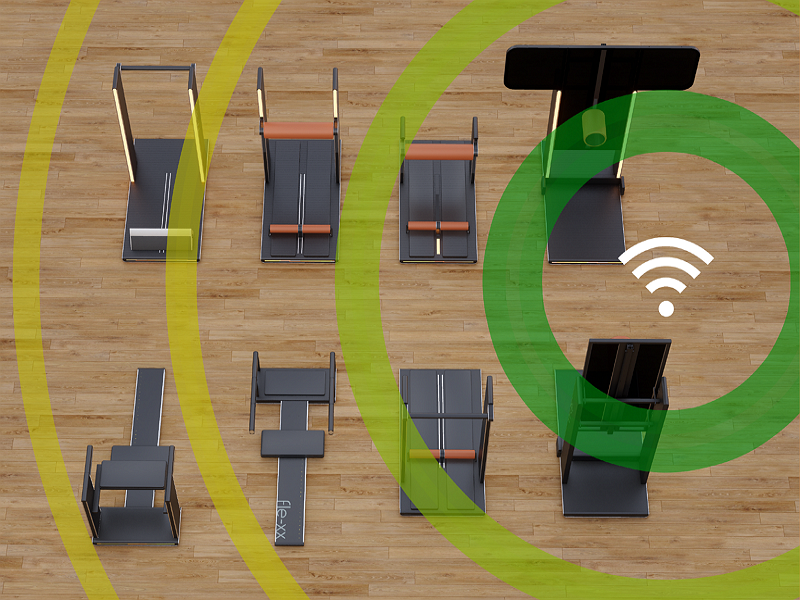
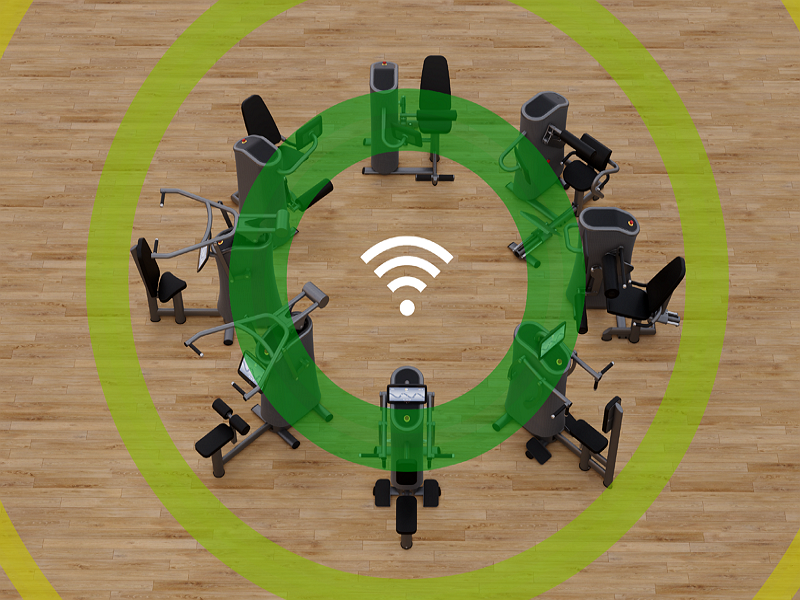
Our machines use 2.4 GHz wireless transmission. The transmission quality is strongly dependent on factors such as the location of the router and the machines, the distance between the router and the machines, interference between router and the machines, and on the load on the Wi-Fi in general.
Use only with an allocated EGYM router.
Place the router approx. 1.5 meters above floor level. Do not place the router on the ground.
The router requires its own active mains power outlet for power and must be connected to the network using a LAN cable.
The router must be installed close to the machines, no further than 15 meters (50 feet) away. Ideally, there should be a direct line of sight between the router and the machines, with no obstructions. EGYM recommends approximately 15 machines in the 15m radius from the router.
If the EGYM machines are more than 15 meters (50 feet) from the router, a wireless access point will be provided, which requires a LAN cable connection directly to the EGYM router.
Do not place the router near any potential sources of interference such as other Wi-Fi equipment, DECT telephones, loudspeakers, Bluetooth devices, microwaves, or electrical cardio equipment, or near large metallic items such as heaters or iron training weights.
Caution
Do not press the factory reset button. This will remove all EGYM configurations on the router and the machines will no longer be connected to the network.
Please note that incorrectly configured Firewalls could cause issues with the EGYM machines. However, if firewalls and MAC filtering are configured in your network, allow exceptions for the IP addresses and ports in the following table to facilitate outgoing connections.
Description | Destination host | Destination ports |
|---|---|---|
Training, updates, device status | 104.199.66.167 35.189.221.132 104.199.91.64 146.148.19.217 104.155.57.166 146.148.15.175 3.127.32.71 18.156.48.111 3.124.243.61 52.37.226.173 35.84.145.167 35.81.42.122 | TCP: All ports |
Remote maintenance | 35.198.87.78 212.114.251.94 192.158.31.31 | TCP and UDP: All ports |
Domain Name Service (DNS) | 8.8.8.8, 8.8.4.4 | TCP and UDP: Port 53 |
NTP Server | Please enable access | |
Cabling of the machines
This section provides some ideas for different cabling configurations for EGYM equipment. As there are benefits and disadvantages in each case, and because each gym is different, we recommend consulting a site planning expert to help you choose a custom configuration for your gym.
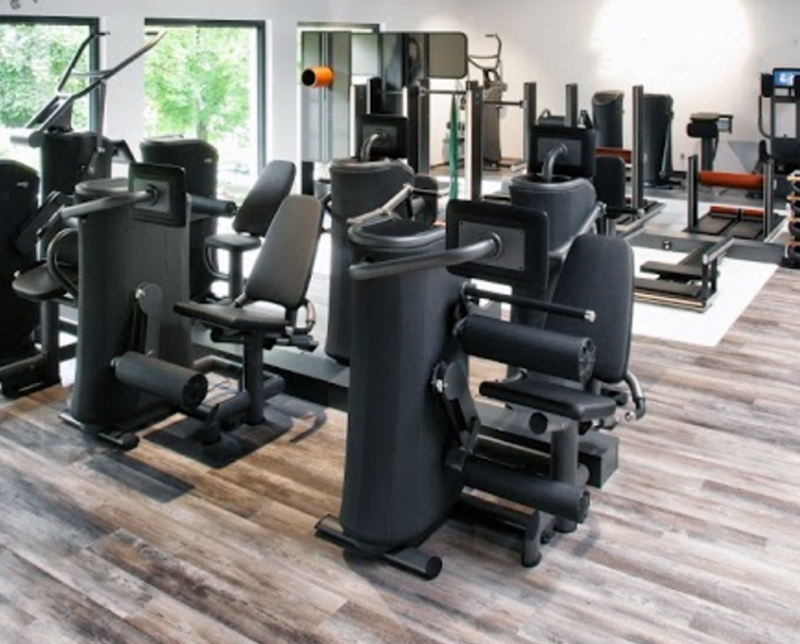
A housing box with sockets and network cable connections can be installed directly behind one or between two rows of machines. This is a potential option, for example for existing gyms.
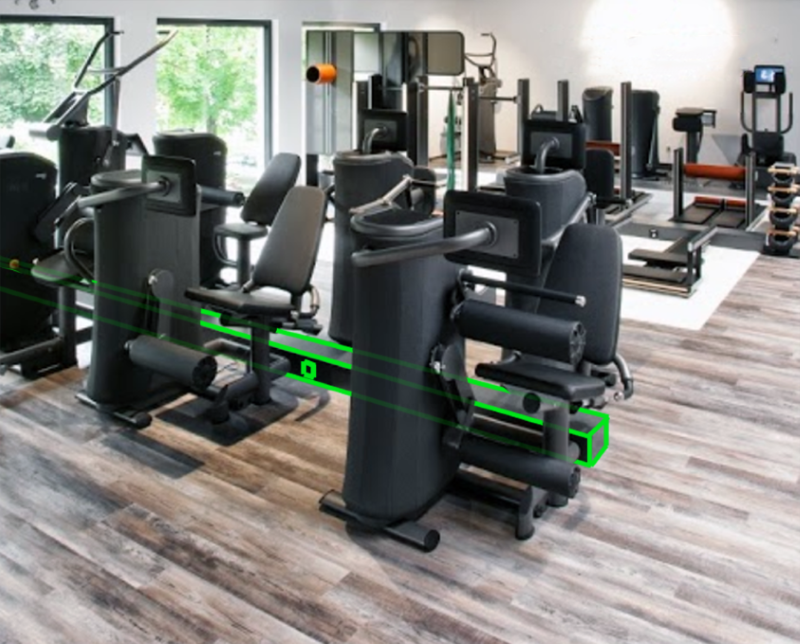
 Advantages
Different design options possible
Very low additional space requirement
Cabling almost invisible
No danger of tripping over cables
 Disadvantages
Requires the machines to be set up side-by-side
Housing box could be a tripping hazard
Sockets and network cable connections are hidden in floor boxes. The cables are only partly visible, running from the box to the machine. The machines are located beside the boxes. This is a potential option, for example for new gyms.
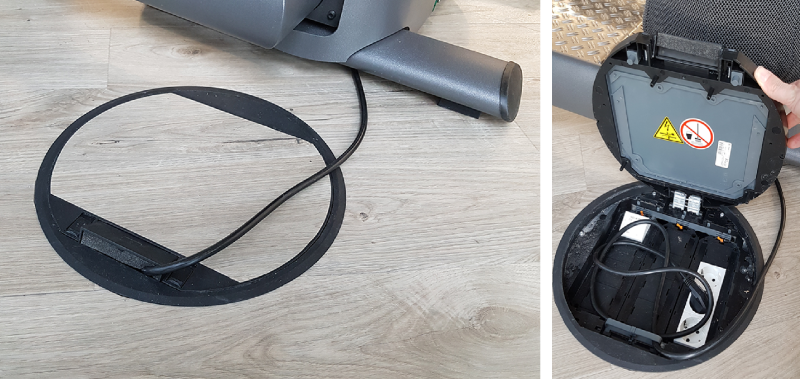
Tip
Floor boxes with smaller dimensions and fewer connections are also available.
Advantages
Possible with any arrangement of the machines
Cabling almost invisible
No additional space required
Disadvantages
The required recesses may not be allowed, or it may not be possible to set them into the flooring.
Requires precise planning and compliance with equipment layout and floor box locations.
Sockets and network cable connections are hidden in floor boxes. The cables are only partly visible, running from the box to the machine. The machines are located beside the boxes. This is a potential option, for example for existing gyms.
Tip
Floor boxes with smaller dimensions and fewer connections are also available.
Advantages
Possible with any arrangement of the machines
Cabling almost invisible
No additional space required
Disadvantages
The step to the platform could be a potential tripping hazard.
Requires precise planning and compliance with equipment layout and floor box locations.
Cables running through cable trunks.
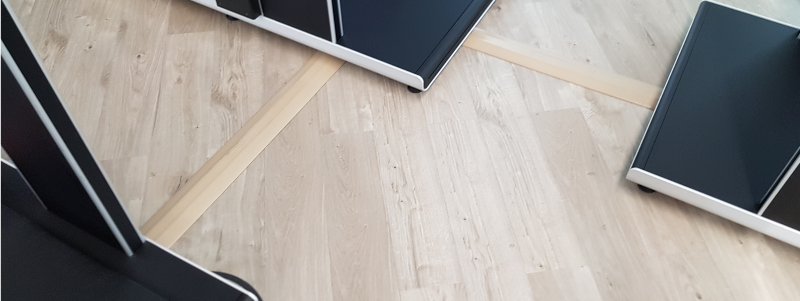
Advantages
No additional space required
Cables can be laid quickly and with little effort
Disadvantages
Limited cable capacity: Only a small number of cables can be fed through the cable trunking.
Cables can be accidentally torn out of the machine if someone trips over loose cable trunking. It is therefore imperative that the cable trunking is firmly glued or screwed to the floor.
Cable trunking is not available in many colors and usually noticeably different from the floor.
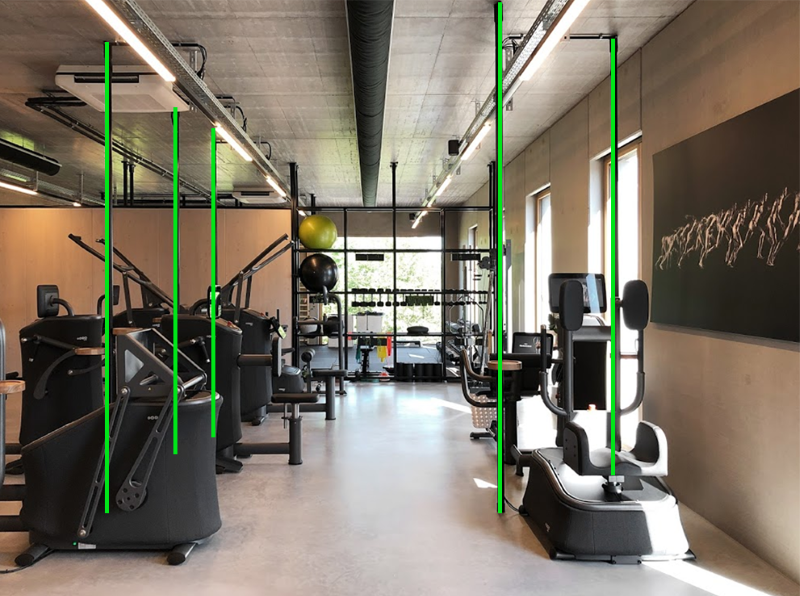
The power and network cables are routed through tubing that extends from floor to ceiling.
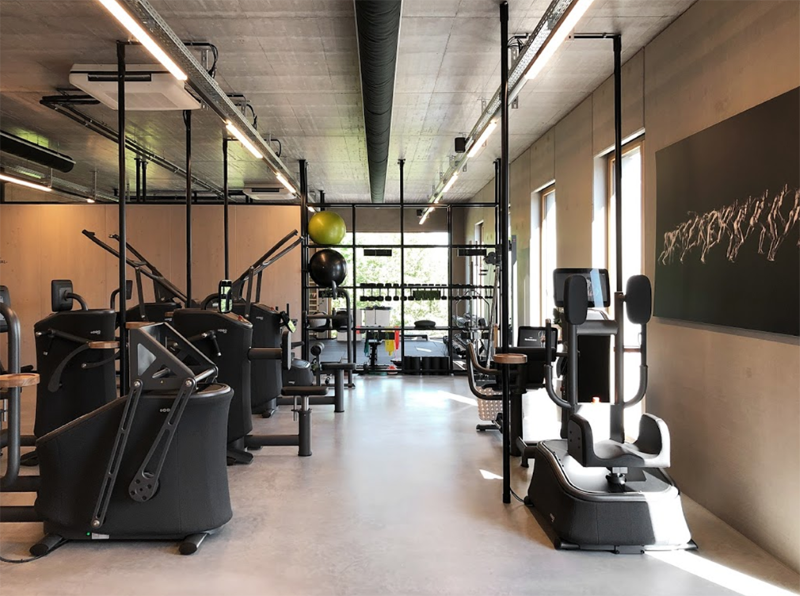
Advantages
Possible with any arrangement of the machines
Only a few centimeters of cable are visible per device
Very little additional space required
Low risk of tripping over the cables
Disadvantages
Tubing can cause obstructions and pose a risk of injury if placed unfavorably
Significantly changes the appearance of the room
Possibly unattractive if cables/cable ducts are visible on the ceiling
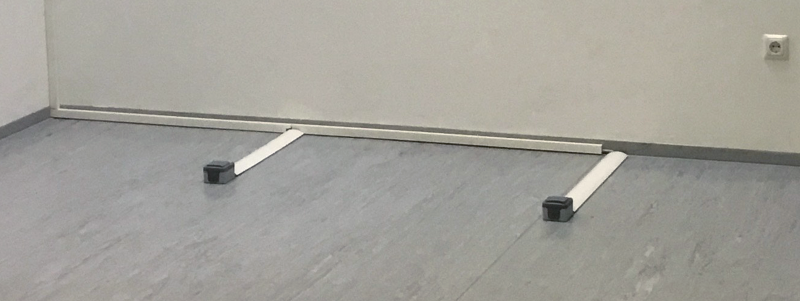
Cables running through cable trunks to surface mounted boxes.
Caution
There is not enough space for surface-mounted sockets to be located under EGYM machines. EGYM machines must therefore not be placed above any surface-mounted sockets.
Caution
This could lead to the machines being damaged.