How can I use Genius to adjust training plans?
Purpose
When using Genius (Genius for Trainers or Genius for All) to create or update a training plan, you may want to make a few changes, like adding new exercises, adjusting reps, or tweaking rest times.
Instead of filling in every missing value manually, you can use the exercise update feature in the EGYM Trainer App to automatically complete the details (sets, reps, weights, and rest times) based on the member’s Genius profile. This saves time while ensuring that the plan is compatible with EGYM's algorithm and personalized to the member.
Uwaga
For more information on how Genius works and plan generation limitations, refer to How does Genius create training plans?
Details
How it works:
Add a completely new exercise: You add a Dumbbell Row without filling in any values. Genius will fill in the sets, reps, weights, and rest times.
Add values to an exercise and update: You add a Dumbbell Row and assign 3 sets. Genius could then add 12 reps, a training weight, and 60 seconds rest (varies depending on the member's strength profile).
Before you start
Make sure your member has completed the onboarding process. Refer to Get started for full instructions.
Solution
Edit the training plan as needed.
On the top right, tap . Genius will automatically predict and fill in any missing strength exercise values.

Uwaga
Cardio and flexibility exercises won't trigger the update option to appear.
Genius will not overwrite values you've already entered.
Once the system adds the predicted values, the Genius status will show .
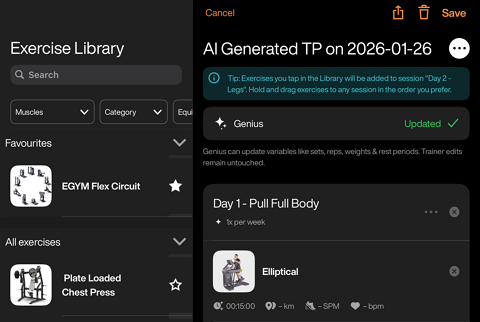
Tap to assign the plan to the member.
Launch the EGYM Trainer App and go to .
Search and tap to select a member.
Tap .
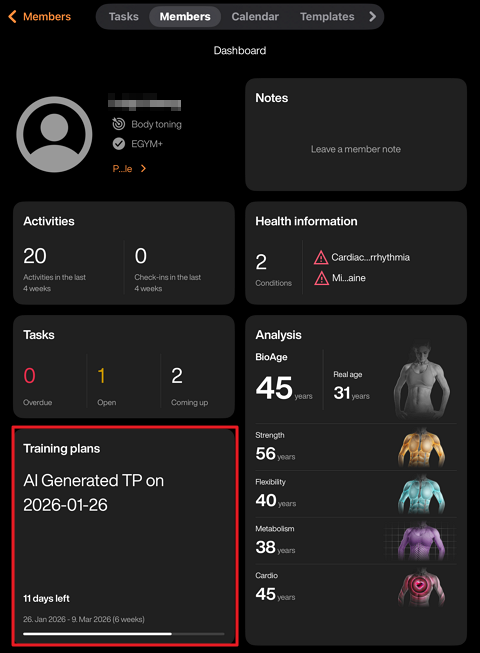
A pop-up will appear. Tap .
Edit the training plan as needed.
On the top right, tap . A pop-up will appear.
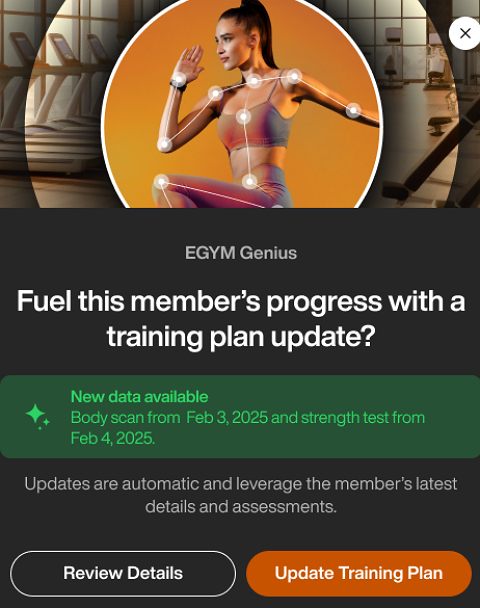
Tap to edit the member's Genius training plan preferences. Tap when done.
Tap to have Genius automatically predict and fill in any missing strength exercise values.
Uwaga
Cardio and flexibility exercises won't trigger the update option to appear.
Genius will not overwrite values you've already entered.
Once the system adds the predicted values, the Genius status will show .
Tap to assign the plan to the member.
Launch the EGYM Trainer App and go to .
Search and tap to select a member.
Tap .
Tap the + icon, then tap .
Select a template and tap .
Edit the training plan as needed.
On the top right, tap . A pop-up will appear.
Tap to edit the member's Genius training plan preferences. Tap when done.
Tap to have Genius automatically predict and fill in any missing strength exercise values.
Uwaga
Cardio and flexibility exercises won't trigger the update option to appear.
Genius will not overwrite values you've already entered.
Once the system adds the predicted values, the Genius status will show .
Tap to assign the plan to the member.