Use the Integration Portal
This page shows you how to navigate and use the EGYM Integration Portal, where you can manage your connections to the Data Hub.
Poznámka
For technical setup guidance, developers should refer to the API documentation.
Log in with your EGYM ID
To log in to the EGYM Integration Portal, use the EGYM ID associated with the email you provided to us during onboarding.
Poznámka
If you did not receive a welcome email or cannot log in to the Integration Portal, contact EGYM support.
Overview
In the EGYM Integration Portal > , you can get a quick understanding of your API usage and integration health across all locations.
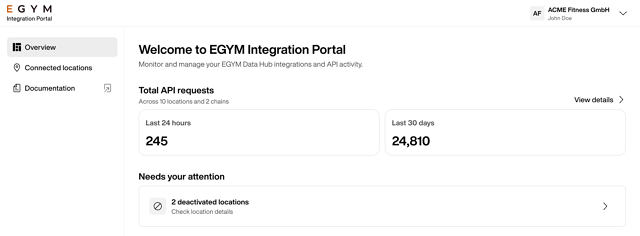
Total API requests: See how many API calls your integrations made in the Last 24 hours and Last 30 days.
Poznámka
Click to see all Connected locations.
Needs your attention: Alerts show integration issues that need action, such as deactivated locations. Click on the alert to go to Connected locations.
Connected locations
In the EGYM Integration Portal > , you can view and manage all your gym locations' API connections in one place. Monitor connection status, track which locations are actively using their API, and access API keys for configurations.
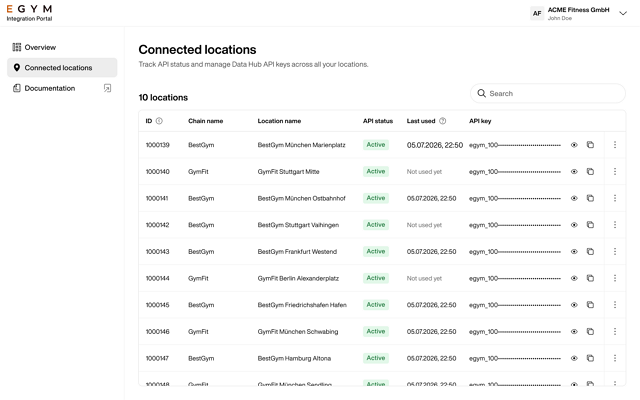
Use the search bar to search for specific chains or locations.
Scroll down to view location data in the table, which includes the following information:
Location ID: Identifier for the location in the EGYM system
Chain name: The studio brand or chain name
Location name: Specific studio location
API status: Active or Deactivated to show whether the API connection is live
Last used: Timestamp of the most recent API request from that location (or "Not used yet")
API key: Masked key for that location's API access
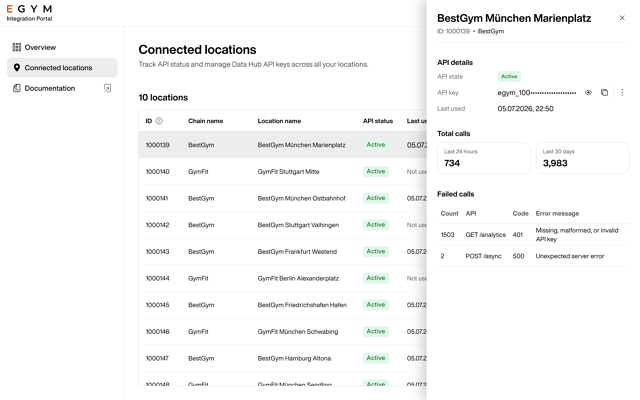
Click on an individual location to view the details in a side panel. Here, you can also see the total and failed API calls for that specific location.