Fitness Hub Maintenance and Troubleshooting
Purpose
EGYM recommends cleaning the Fitness Hub weekly or as needed.
Details
EGYM recommends specific cleaning products from DR. SCHNELL GmbH (www.dr-schnell.com) and STRAUSS (www.strauss.com). If these products are not available in your region, use a comparable product.
Product | Supplier | Surface |
|---|---|---|
FOROL | DR. SCHNELL | Display, camera, metal surfaces |
Plastic Cleaner #7 | STRAUSS | Plastic surfaces |
FLOORTOP | DR. SCHNELL | Rubber feet |
NOVO PEN-OFF | DR. SCHNELL | Textile covering |
Solution
Remove dust buildup below the camera
Anmerkung
Remove dust buildup below the camera before cleaning the Fitness Hub camera and textile covering.
Check the front of the Fitness Hub below the camera for dust buildup.
Remove dust with a dry microfiber cloth, by gently tapping or wiping the area.
Clean the Fitness Hub display, camera, and metal surfaces
Turn off the Fitness Hub.
Fill a FOROL hand sprayer with 600 ml of cold water, and screw in the FOROL cartridge.
Spray the solution onto a soft cloth.
Achtung
Do not apply cleaning products directly to the display or camera, and make sure the display and camera are dry after cleaning.
Wipe the display, camera, textile covering, metal surfaces, and plastic surfaces.
Wipe all surfaces dry with a clean cloth.
Clean plastic surfaces
Turn off the machine.
Spray the Plastic Cleaner #7 on a clean cloth.
Wipe the plastic surfaces of the machine.
Clean the rubber feet
Turn off the machine.
Dilute the FLOORTOP cleaner according to the manufacturer instructions.
Clean the rubber feet with the FLOORTOP solution.
Wipe the rubber feet dry with a clean cloth.
Clean visible marks or buildup on the textile covering
Turn off the machine.
Spray NOVO PEN-OFF onto a dry microfiber cloth and wipe the affected area of the textile covering.
Achtung
To prevent damage, always use a microfiber cloth to clean the textile covering.
Dry the textile covering completely with a clean cloth.
Purpose
Disinfect EGYM machines regularly to support a hygienic training environment.
Details
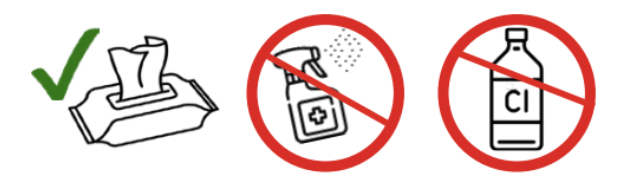 |
EGYM recommends using disinfectant wipes because they help maintain hygiene while reducing aerosol exposure from sprays. Wipes are quick to use, can be used on multiple machines, and help control the amount of disinfectant applied.
EGYM recommends the disinfectant DESIFOR-PLEXIFEE from DR. SCHNELL GmbH (www.dr-schnell.com). If this product is not available in your region, use a comparable product.
To prevent damage to EGYM machines:
Do not use disinfectants that contain chlorine.
Do not use disinfectants with more than 45% alcohol.
Only use disinfectants on the contact surfaces of the machines.
Solution
Use a disinfectant wipe, or spray the disinfectant onto a soft cloth.
Achtung
Do not spray disinfectant directly onto any part of the machine, including the display.
Wipe the contact surfaces of the machine.
If the disinfectant leaves a residue on the display, wipe the display with a damp cloth.
Dry the display completely with a clean cloth.