Smart Flex Maintenance and Troubleshooting
Purpose
EGYM Smart Flex machines use light and vibration signals to indicate when to exercise and rest. Refer to Wie funktioniert Smart Flex? for more information.
Outside of normal exercise, the light colors indicate the machine status and when action is required.
Details
The machine is starting up or adjusting to member settings.
Action: Wait until the light changes to a different color.
The member has logged on. The system is checking whether the member has an account or machine settings.
Action: Wait until the light changes to a different color.
The mechanism is partially blocked. This can happen if a member steps onto the machine before calibration is complete or if an object is blocking the mechanism. Keep clear of the machine during calibration and adjustment.
Action: Check for any obvious obstructions, such as free weights or clothing on the machine.
Login failed, or a blockage cannot be resolved.
Action:
Log in again.
If needed, restart the machine.
If the issue continues or occurs regularly, contact EGYM Support.
No Internet or LAN access is available.
Action:
Check that the LAN cable is connected.
Check that the Wi-Fi router is functioning.
If needed, restart the machine.
If the issue occurs regularly, contact EGYM Support.
The member RFID tag is not linked to an EGYM account.
Action: Onboard the member.
The Smart Flex machine has no saved settings for the member account; the member needs instructions to use the machine.
Action: Onboard the member on the Smart Flex machine.
A software update is in progress.
Action: Wait until the update is complete.
Achtung
Do not switch off the machine. The update should take less than 30 minutes.
Purpose
EGYM recommends cleaning Smart Flex machines weekly, or as needed.
Details
EGYM recommends specific cleaning products from DR. SCHNELL GmbH (www.dr-schnell.com) and STRAUSS (www.strauss.com). If these products are not available in your region, use a comparable product.
Product | Supplier | Surface |
|---|---|---|
FOROL | DR. SCHNELL | Pads, keypad, metal surfaces, plastic surfaces |
Plastic Cleaner #7 | STRAUSS | Plastic surfaces |
FLOORTOP | DR. SCHNELL | Rubber feet |
NOVO PEN-OFF | DR. SCHNELL | Pads, keypad |
Solution
Clean the machine pads, keypad, and metal surfaces
Turn off the machine.
Fill a FOROL hand sprayer with 600 ml of cold water, and screw in the FOROL cartridge.
Spray the solution onto a soft cloth.
Wipe the pads, keypad, metal surfaces, and plastic surfaces.
Wipe all surfaces dry with a clean cloth.
Clean plastic surfaces
Turn off the machine.
Spray the Plastic Cleaner #7 on a clean cloth.
Wipe the plastic surfaces of the machine.
Clean the rubber feet
Turn off the machine.
Dilute the FLOORTOP cleaner according to the manufacturer instructions.
Clean the rubber feet with the FLOORTOP solution.
Wipe the rubber feet dry with a clean cloth.
Clean visible marks or buildup on the pads and keypad
Turn off the machine.
Spray NOVO PEN-OFF onto a soft, dry cloth and work it into the affected area.
Wipe the area with a clean, damp cloth using water only.
Purpose
Smart Flex machines should be lubricated when the mechanisms make high-frequency noises during movement. Depending on machine use and ambient conditions, this may occur every 2 to 12 months.
Details
Check monthly for any sound exceeding a sound pressure level of 80 dB(A) measured over a 1-meter distance. If this occurs, you may need to lubricate the Smart Flex machine.
Only lubricate Smart Flex mechanisms with Interflon Fin Super. The lubricant can be ordered from EGYM Support (order number: S116-00680-01).
Achtung
Do not use other lubricants. Other products can damage the machine and may void the warranty.
Solution
|
|
| |||
|
|
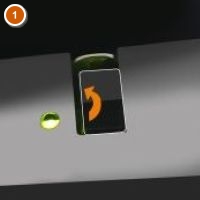
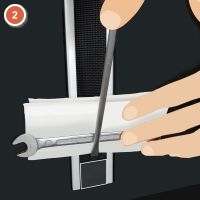
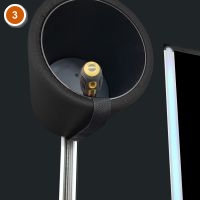
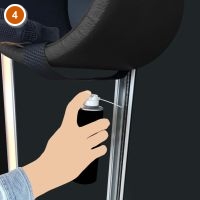
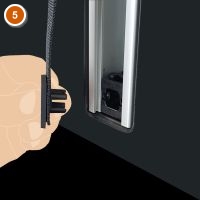
Switch the machine off, wait 10 seconds, and switch the machine on. The pad will move the the end position.
Remove the cap at the end of the belt, protecting the surface of the belt with a paper towel or soft material.
Secure the belt away from the track.
Spray the lubricant along the belt's track.
Reattach the cap.
Move the pad to the opposite position.
Anmerkung
This step requires trainer rights. Tap your RFID tag twice to log in as a trainer.
Repeat steps 1 to 5 to lubricate the other end of the track.
To check the mechanisms, press two opposite arrow buttons at the same time for approximately 6 seconds. The pad will move through the entire range of motion 5 times.
Purpose
Disinfect EGYM machines regularly to support a hygienic training environment.
Details
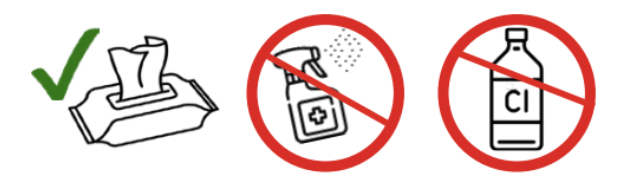 |
EGYM recommends using disinfectant wipes because they help maintain hygiene while reducing aerosol exposure from sprays. Wipes are quick to use, can be used on multiple machines, and help control the amount of disinfectant applied.
EGYM recommends the disinfectant DESIFOR-PLEXIFEE from DR. SCHNELL GmbH (www.dr-schnell.com). If this product is not available in your region, use a comparable product.
To prevent damage to EGYM machines:
Do not use disinfectants that contain chlorine.
Do not use disinfectants with more than 45% alcohol.
Only use disinfectants on the contact surfaces of the machines.
Solution
Use a disinfectant wipe, or spray the disinfectant onto a soft cloth.
Achtung
Do not spray disinfectant directly onto any part of the machine, including the display.
Wipe the contact surfaces of the machine.
If the disinfectant leaves a residue on the display, wipe the display with a damp cloth.
Dry the display completely with a clean cloth.