Tasks
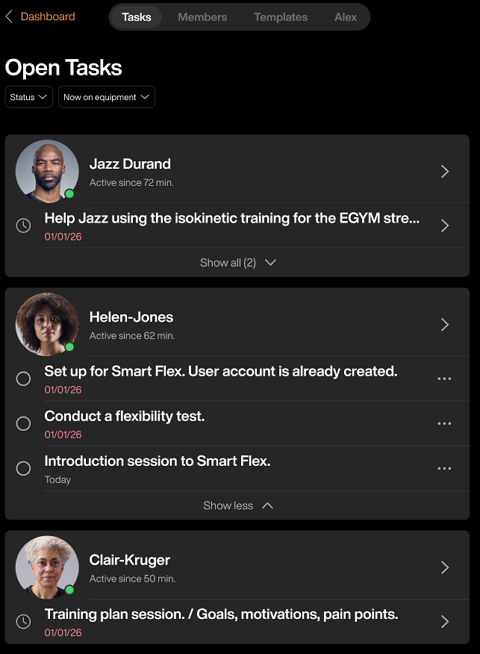
The page shows all open actions for members at your gym, organized by member and sorted by completion date. This shared view helps your team stay aligned on member follow-ups and progress checks.
What is a Task?
A task is a single action or reminder assigned to a specific member. All trainers at the gym see these tasks, so your team can coordinate follow-ups. Tasks appear on your main page and in the member's profile. You can create them individually for a member, or they can be generated automatically as part of a Task Chain.
Each task includes:
Description: What you need to do (e.g., "Send progress email to Sarah")
Activation date: When the task appears (immediate or future)
Task lists are grouped by member and generated from:
Task chains assigned to the member
Individual tasks created for the member
Members are sorted by availability:
Members currently in the gym appear first (indicated by a green dot next to their profile)
Members not currently in the gym appear after
The following information is shown for each member's task list:
Member name and last check-in date
Tasks sorted by completion date urgency (most overdue or upcoming tasks appear first)
Default view shows one task; expand it to show additional tasks
Why use tasks
Tasks keep your member interactions organized without relying on notes or memory. They help you:
Focus on in-gym touchpoints: Members currently in the gym appear first, so you can engage with them in real time
Prioritize by urgency: Members with overdue or upcoming task deadlines are highlighted, helping you focus on the most pressing follow-ups
Track follow-ups: Maintain a complete record of progress checks and member touchpoints across your entire roster
Link actions to members: Remember exactly which member needs which action, so nothing falls through the cracks
Schedule in advance: Plan future touchpoints (e.g., reassessments after time away) and let the system remind you when they're due
Stay consistent: Ensure your team follows the same engagement cadence for every member
Free up mental space: Rely on the task system instead of memory, so you can focus on training quality
Note
For repeatable workflows (like new member onboarding), refer to Task chains.