Föreskriv EGYM Smart Strength-maskiner
För EGYM Smart Strength-maskiner kan du få träningsparametrarna inställda automatiskt, eller så kan du lägga till dessa värden manuellt. Beroende på medlemmens preferenser kan Genius AI lägga till dessa maskiner med antingen automatiska värden eller specifika repetitioner. Du kan redigera detta manuellt.
Tryck på en EGYM Smart Strength-övning i träningsplanen.
För , trycker du på eller .
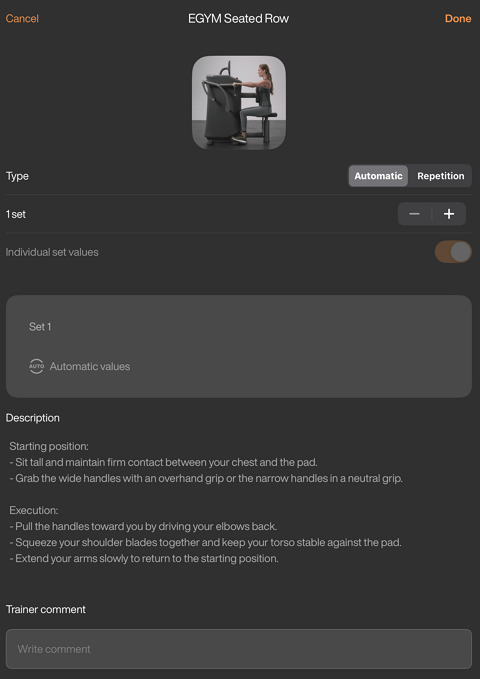
Lägg till eller ta bort set genom att trycka på – eller +.
För Smart Strength-övningar med mer än ett set kan du välja att aktivera för att anpassa inställningarna för varje set.
För manuella inställningar (-fliken) kan du redigera träningsmetoder, repetitioner och vilotid för varje set efter behov.
Tryck på för att spara inställningarna för Smart Strength-övningen och tryck sedan på . Planen tilldelas medlemmen och finns på hens under .
Notera
Genius föreskriver inte träningsmetoder på EGYM Smart Strength-maskiner i träningsprogram. Dessa kan redigeras manuellt.
Beroende på ditt gyms konfigurationer, kanske alternativen (, , ) inte är tillgängliga. Om du inte ser dessa alternativ och vill aktivera dem, kontaktar du ditt gyms administratör. De kan kontakta oss genom att fylla i vårt kontaktformulär.