Payouts
The > page in the EGYM Business Suite shows gross payout amounts, session volumes, and month-over-month growth to help you understand revenue performance.
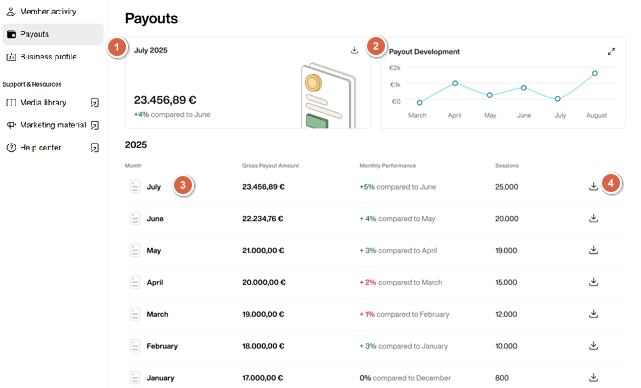
The top left card shows information for the most recent payout month.
The top right card shows Payout Development over the past six months via a graph.
Scroll down to get the payout overviews for each month. The data on the page include:
Gross Payout Amount: Total revenue for the current month (updated daily).
Monthly Performance: Percentage change compared to the previous month (green for growth, red for decline).
Sessions: Total member sessions recorded during that month.
Click the download icon next to individual months to download the full report for that month in PDF format.