Gameday
Manage Gameday settings on Smart Strength machines.
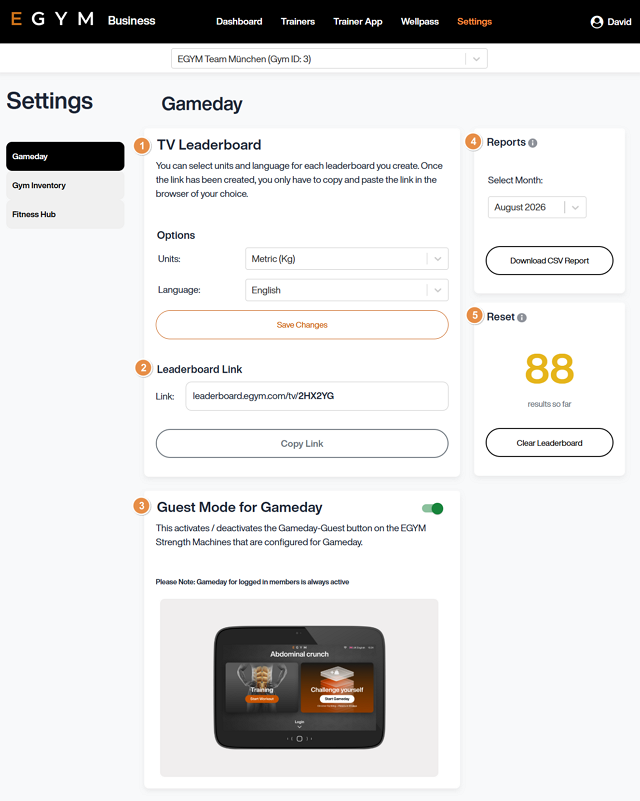
TV Leaderboard - Select units and language that the leaderboard should use.
Leaderboard Link - Copy the link to your leaderboard.
Guest Mode for Gameday - Activate or deactivate the Gameday-Guest button on Smart Strength machines.
Reports - Download Gameday reports by month.
Reset - View and reset leaderboard results
Bevor du startest
Um Gameday in deinem Fitnessstudio zu aktivieren, benötigst du Folgendes:
Fitness Hub für das Onboarding und die Assessments von Mitgliedern.
EGYM Smart Strength Geräte auf EGYM Pro eingestellt. Kontaktiere den EGYM Kundenservice, um EGYM Pro zu aktivieren. Wir empfehlen außerdem die EGYM+ Aktivierung.
Gastmodus für Gameday in der Business Suite aktiviert.
Member App zum Tracken von Workouts und Ansehen von Bestenlisten.
Kompatible Verwaltungssoftware für Mitglieder. Erfahre mehr über kompatible Lösungen auf der EGYM Website.