How do I change the machine brand in a Genius AI training plan?
Purpose
EGYM Genius AI automatically selects a suitable machine for each exercise based on available data (e.g., gym inventory, strength data, and user attributes).
Because different machine brands use different ergonomic curves, the same weight can feel and perform differently across machines. To ensure accurate training weights, we recommend confirming or adjusting the machine brand.
This article shows you how to do this in the Trainer App.
Before you start
You must be logged in to the Trainer App.
The training plan must be generated or updated by Genius AI.
selection is only available for machine-based exercises.
Solution
Change the machine brand in Genius AI plans
Starte die EGYM Trainer App und gehe zu .
Suche und tippe auf ein Mitglied, um es auszuwählen.
Tippe auf .
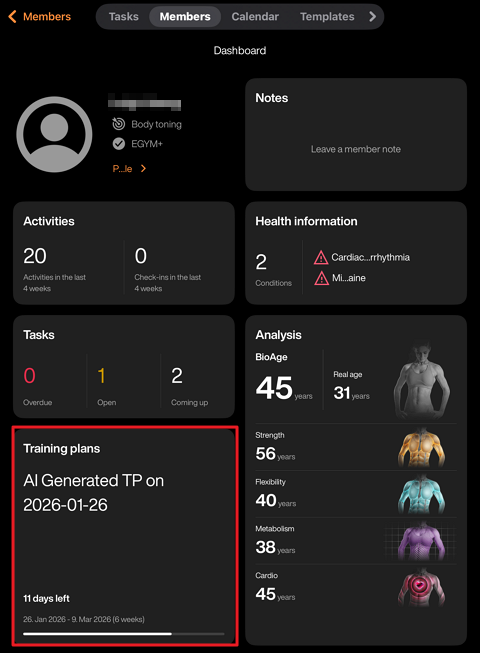
Select a Genius AI training plan.
Tap on the exercise.
Tap and select the correct one.
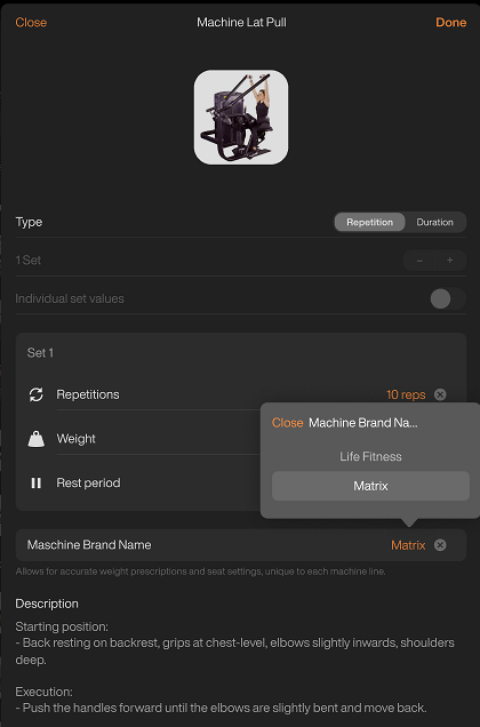
Tap and the tap .
Anmerkung
The field may not appear for certain exercises or plans. For more information on this and other troubleshooting questions, refer to Genius AI provided the incorrect machine brand for an exercise, or didn't provide it at all. What can I do?