Member Profile
Your Profile allows you to access and manage account information, connected devices, app settings, and support options from your profile page.
To access this page in the Member App, tap your profile photo (or initials) in the top left corner.
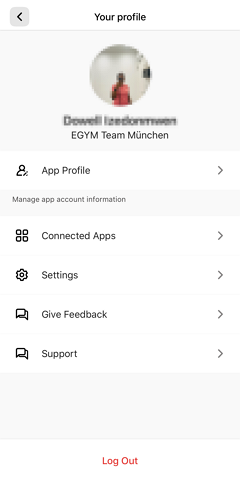
The App profile is used to manage user app account information including personal details, profile picture, home gym location, and other account settings. This is where you can update your profile information and customize your account preferences.
Connect third-party fitness apps and wearable devices to your EGYM Member App. This allows you to sync workout data from other platforms (like Fitbit, Apple Health,Garmin Connect, Strava, etc.) and track all your fitness activity in one place. For more information see Connected Apps & Wearable.
You can adjust app preferences and notifications. Configure options such as:
Privacy settings to control whether your activity is visible to others in the Activity Feed and review data processing settings.
Notification preferences.
About EGYM contains Terms of Use and Privacy Policy.
Other personalization options, such as the
You can submit feedback directly about your gym experience. Share suggestions, report issues, or let the gym know what aspects you would like to see improved, whether it is the facility, equipment, class, or instructor.
Get help with technical issues and access the FAQ. On the Support page, you can:
Report problems: Submit app technical issues and equipment issues directly to your gym administrators.
Access FAQs: Use the question mark button to view frequently asked questions.
Anmerkung
The Support feature facilitates communication between members and gym staff. Gym administrators can view member feedback and overall stats in the EGYM Business Suite, where they can reach out to members directly via email and resolve feedback once it has been addressed.