Why doesn't Genius AI add training methods to Smart Strength exercises?
Details
When adding EGYM Smart Strength exercises to Genius AI training plans, the exercise by default is in “Automatic” mode, where training methods and reps are prescribed via the machines instead of via Genius.
If you (the trainer) change Smart Strength exercises to Repetition mode in the Trainer App, you can edit sets, training methods, repetitions, and more to better customize your member's training plan. When doing this, you'll be required to fill in the training method and reps for each EGYM Smart Strength exercise. You can have Genius AI do this automatically, or you can update the values yourself manually.
Solution
Use either of the following methods to customize training methods and reps for Smart Strength exercises in Genius AI training plans.
When editing a Genius training plan, tap on an EGYM Smart Strength exercise and select Repetition.
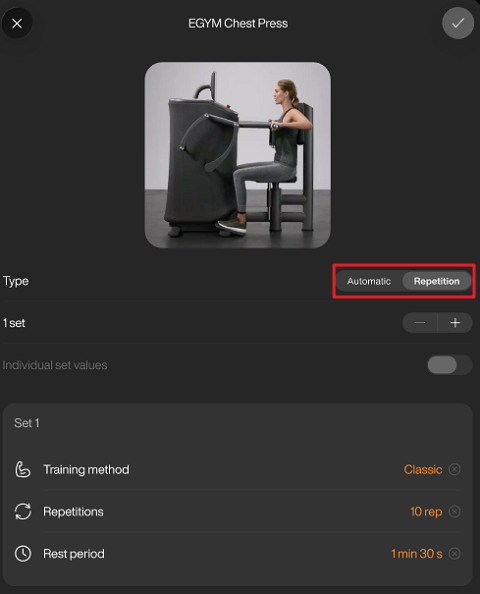
Tap + or - to adjust the number of sets.
Anmerkung
To allow different values for each set, enable Individual set values.
Tap the checkmark to confirm.
Follow steps 1 to 3 again for all EGYM Smart Strength exercises in the workout that you want to edit.
At the top of the screen next to Genius, tap .
Genius will fill in all parameters for EGYM Smart Strength exercises in the workout.
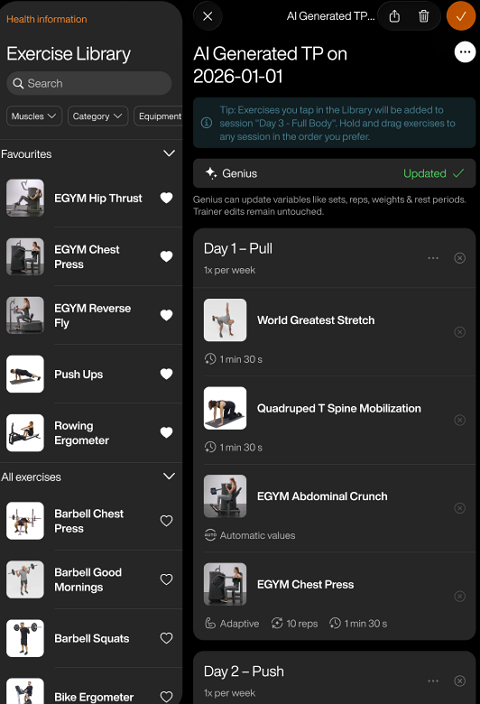
Tap the checkmark to confirm and assign the plan to the member.
Anmerkung
Abhängig von der Konfiguration deines Fitnessstudios sind die Optionen (, , ) eventuell nicht verfügbar. Wenn diese Optionen nicht zu sehen sind und du diese aktivieren möchtest, wende dich an den Administrator deines Fitnessstudios. Du kannst uns erreichen, indem du unser Kontaktformular ausfüllst.
When editing a Genius training plan, tap on an EGYM Smart Strength exercise and select Repetition.
Tap + or - to adjust the number of sets.
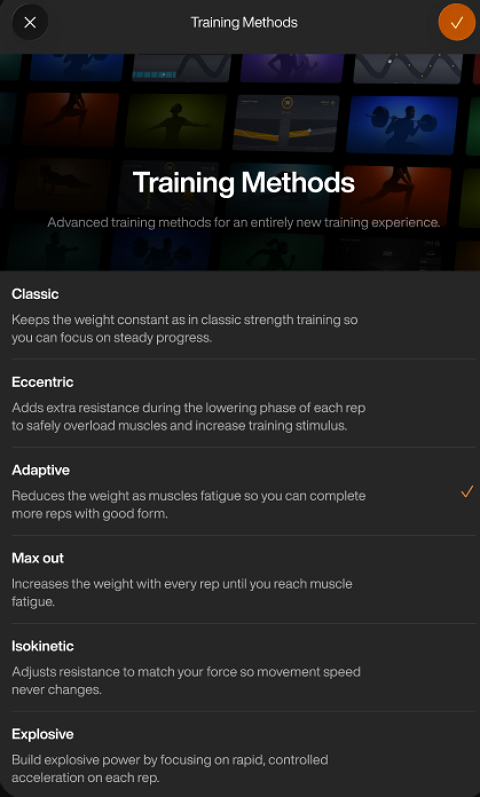
Edit the , , and as needed. Tap the checkmark once done.
Anmerkung
For Classic, Eccentric, Adaptive, Isokinetic, and Explosive training methods, you can enter between 5 to 30 reps per set on EGYM Smart Strength machines. If you want to prescribe more than 30 reps, add more sets to the exercise until it reaches the total number of sets you want.
Follow steps 1 to 3 for all EGYM Smart Strength exercises in the training plan.
Tap the checkmark to confirm and assign the plan to the member.