Genereer je eerste trainingsschema
Open de Member App.
Tik onder op .
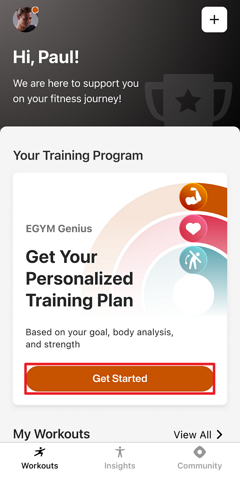
Volg de instructies op het scherm om:
je fitnessdoel in te stellen
een lichaamsanalyse te voltooien op de Fitness Hub
krachttests te doen op Smart Strength
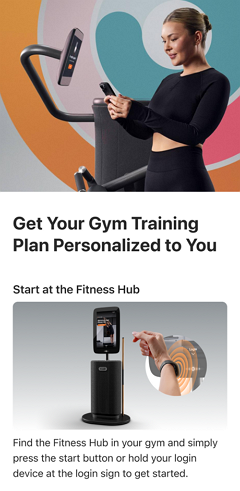
Zodra je de eerste onboarding hebt voltooid, tik je terug in de app op .
Opmerking
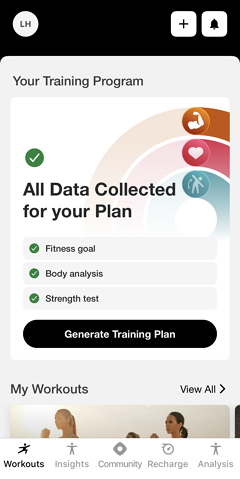
De Genius-onboardingchecklist wordt bijgewerkt terwijl je bezig bent. Als je een stap mist (zoals een krachttest), laat de app zien wat er nog over is en begeleidt de app je bij het voltooien ervan.
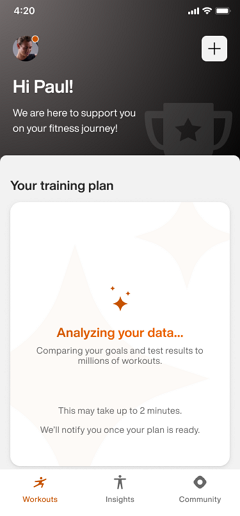
Genius begint met het genereren van je schema. Je krijgt een melding zodra het klaar is.
Opmerking
Zorg dat meldingen zijn ingeschakeld in de instellingen van je toestel. Kijk anders later nog eens in de app.
Belangrijk
Voor fitnessclubeigenaren:
Om ervoor te zorgen dat leden pushmeldingen ontvangen, moet de Member App van je fitnessclub updates kunnen publiceren. Zorg dat de accounthouder alle vereiste Apple App Store Connect-overeenkomsten heeft geaccepteerd, inclusief zowel de standaard licentieovereenkomst als eventuele vereiste overeenkomsten voor betaalde apps.
Voor Android geldt: als je fitnessclub een eigen Google Play-ontwikkelaarsaccount beheert, moet je de Google Play-distributieovereenkomst voor ontwikkelaars accepteren.